

How to Buy & Use Your Digital Tickets
Everything you need to know about purchasing tickets, accessing them on game night, and getting into the venue.
Buying Your Tickets
Quick and secure online purchasing in just a few clicks.
Choose Your Game
Browse upcoming fixtures and select the game you want to attend. Check dates, times, and venue details.
Select Ticket Type
Pick from available ticket categories - Adult, Concession, Junior, Family bundles, and more.
Secure Checkout
Complete your purchase with our secure payment system. You'll receive instant confirmation.
Receive Confirmation
Your e-tickets are emailed to you immediately and stored in your account for easy access.
You'll need to create an account or log in to purchase tickets. This ensures your tickets are securely stored and always accessible.
Accessing Your Tickets
Your tickets are always available - in your email and your account.
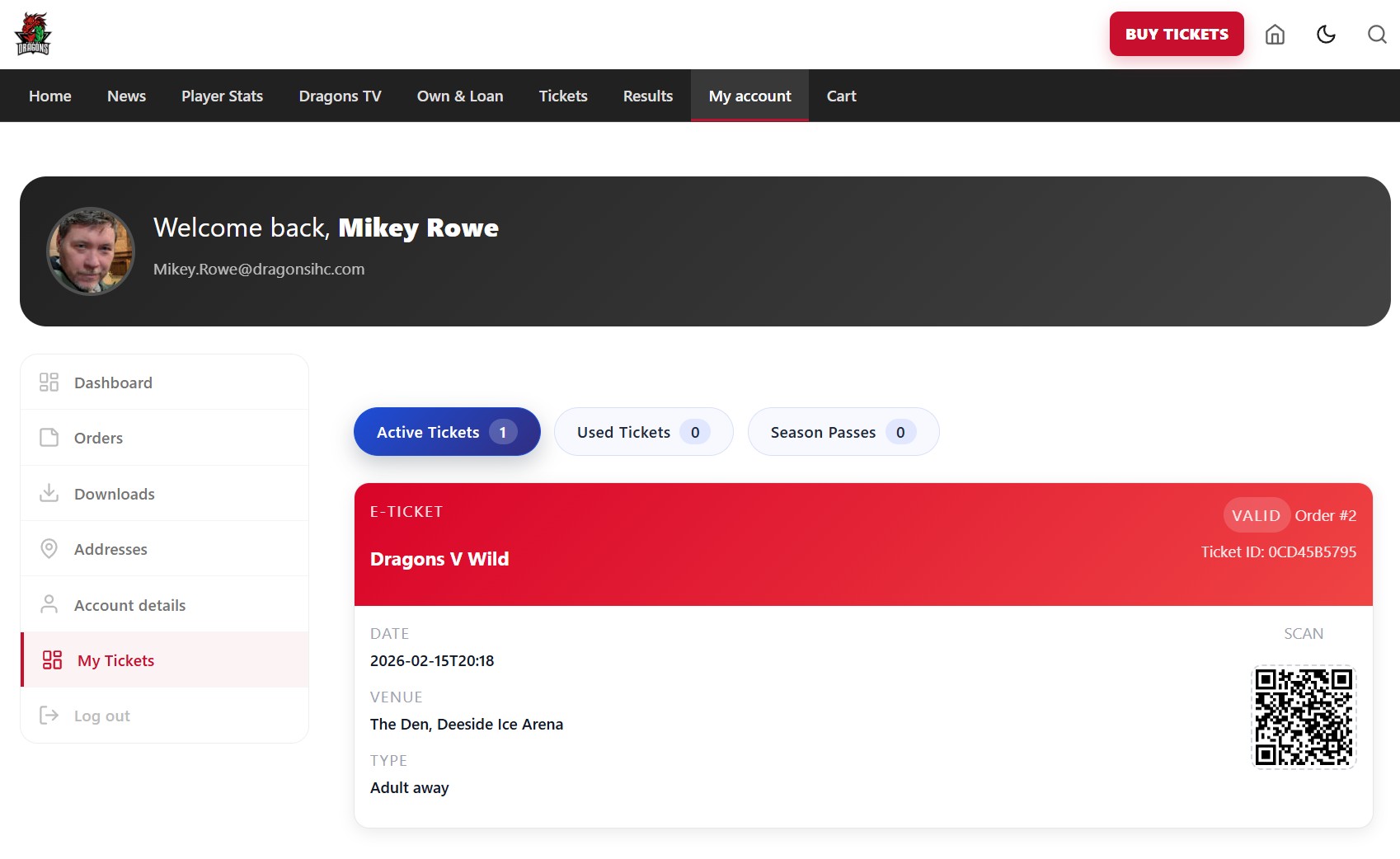
Find Your Tickets in My Account
Your game night tickets are stored in My Account under the My Tickets tab for quick and easy access.
- Tickets are emailed to you after purchase
- Also stored in your account for backup
- Quick access on game night from any device
- View Active Tickets, Used Tickets, and Season Passes
On Game Night
Getting into the venue is quick and contactless.
Open Your Ticket
Pull up your ticket from your email or My Account. Make sure the QR code is clearly visible on your screen.
Show at the Gate
Present your QR code to the staff at the venue entrance. They'll scan it with their device.
You're In!
Once scanned, you're checked in. Head to your seat and enjoy the game!
Each QR code can only be scanned once. After entry, the ticket is marked as used to prevent duplicate entries.
Pro Tips
Make your game night experience even smoother.
Screenshot Your QR
Take a screenshot before you arrive in case of poor signal at the venue.
Charge Your Phone
Make sure your device has enough battery to display your ticket at the gate.
Arrive Early
Give yourself time to find parking and get through the gates before face-off.
Increase Brightness
Turn up your screen brightness so the scanner can read your QR code easily.
Need Help?
We're here to help if you run into any issues.
Can't Find Your Tickets?
Check your spam folder for the confirmation email, or log into your account and go to My Tickets.
QR Code Not Scanning?
Increase screen brightness, remove any screen protector glare, or ask venue staff for assistance.
Need to Contact Support?
Visit our contact page for support and we'll get back to you as soon as possible.